Category: UI/UX, Case Study
Overview
Context:
This project is a part of Dibimbing.id bootcamp program. I was assigned to find a real problem faced by Whatsapp user and provide solution.
Problem:
Some user find it difficult to obtain suitable Stickers for their conversation due to indirect user journey.
Goal:
This project aims to simplify user’s journey when using Sticker feature in Whatsapp.
Approach:
This project use Design Thinking Framework and supported by research method such as usability testing and qualitative interview.
Output:
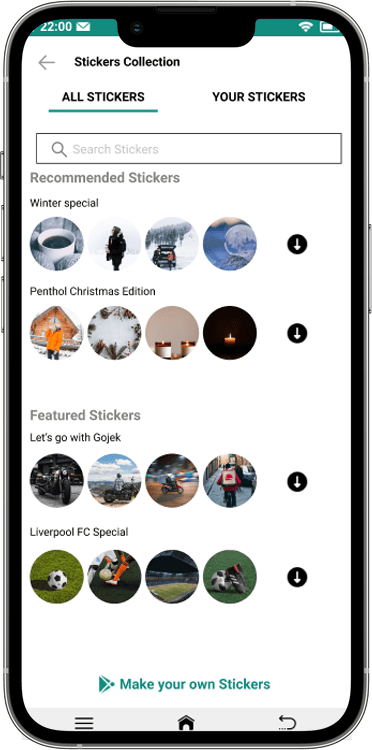
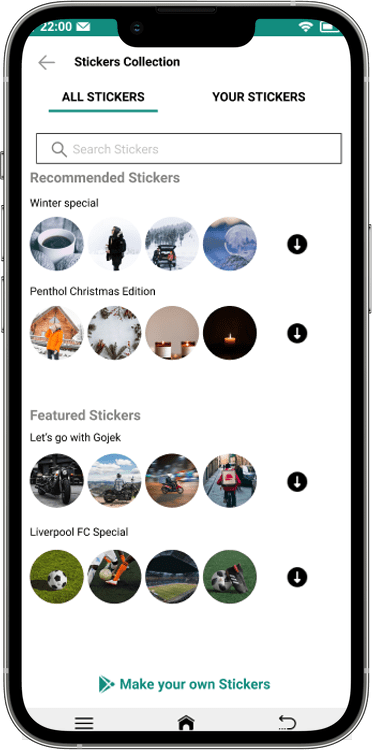
The output of this project is a Sticker Collection Page where user can access and obtain Stickers easily.
Project Scope
- UX Research
- UI Design
- Testing
My Role
- Conduct user research
- Day-to-day UI Designer
- Create prototype
- Usability testing
Date
October – December 2021
Note: this case study is made based on Whatsapp UI/UX on October – December 2021. There may have been updates or revamp since then.
Introduction
Whatsapp is a popular free chatting app in Indonesia. It is used for various purpose from personal, casual, and professional conversation.
One of its feature that used frequently by its user is called Sticker. It has variety of image and animated character that can be used in a conversation to express emotion in a fun and lighthearted way.
However, some user find it difficult to obtain suitable Stickers for their conversation. This project will be focused on improving Sticker feature usability.
The Goal
As a chatting app, Whatsapp has several competitors in Indonesia, for example is Line and Telegram. These competitors offers similar services with Whatsapp, including Sticker or Emoticon feature.
Upon some research, we find out that several Whatsapp user has some difficulties in using Stickers. This might cause those user tend to unable or unwilling to use Sticker feature.
Therefore, the goal of this project is to create a UI/UX design to improve the Sticker feature usability in Whatsapp.
Insights
Qualitative Research
To understand how Whatsapp user use Sticker, their behavior, problems, and pain points, we conduct a research to Whatsapp user. We choose the method of qualitative research to obtain deep insight and understand their journey when using Sticker.
Participant criteria
- Actively use Whatsapp
- Join and active in Whatsapp Groups
- Have >100 Stickers collection
Key information area
- User perception toward Sticker feature
- How user obtain Stickers
- Problems user experience in getting Stickers
We managed to interview 4 participants that matched the criteria. This research took about 1 week to complete.
From this research, we can conclude the user persona for our project is as follows:
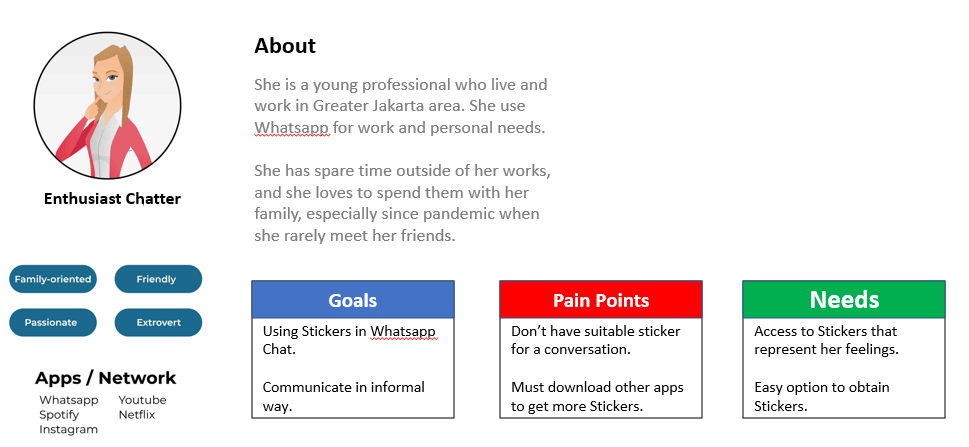
After getting the general profile of Whatsapp sticker user, we analyzed their insight and perception toward Sticker feature. We divide the problems into 3 categories: Obtaining sticker, Choosing sticker, and Using sticker. Their insight can be summarized in the affinity map below:

As we can see, user has more problems in obtaining Stickers compared to other processes. Whatsapp has provided steps for users to download Stickers, however none of our participants mentioned or aware of that process, they prefer alternative method to obtaining Stickers.
From this analysis and further insight from our participants, we can determine user’s journey as follows:
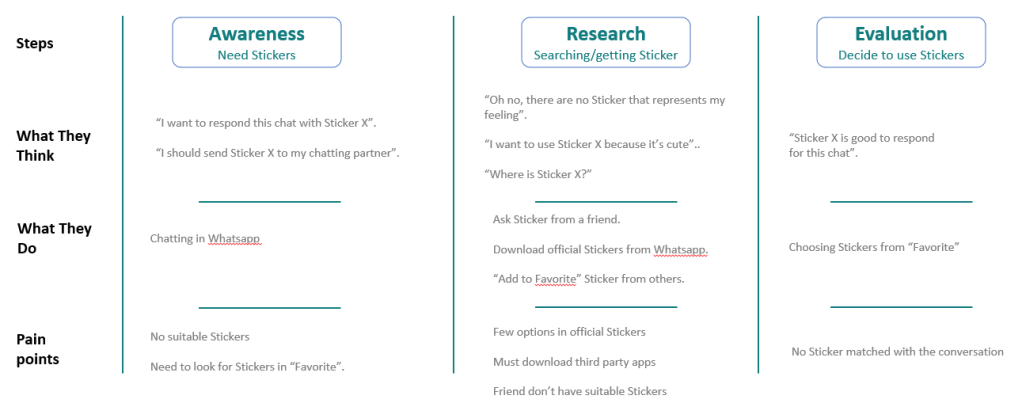
Problem Statement & “How Might We”
From user persona, affinity map, and user journey, we can conclude a problem that user experienced is:
“User must go through several steps to search and obtain desired Stickers”.
With this problem statement, we came up with a “How Might We” statement to solve this issue. Our HMW is “How might we simplify the process of searching and getting Stickers?“
Solution
Based on the problem statement and “How Might We”, we came up with an idea to solve this problem by create a specific page for Stickers.
By creating a page for Stickers, it would make the process of obtaining and using Stickers faster and easier for user. From the business perspective, there are also some benefits of having a Stickers page for Whatsapp. These are the potential benefits for user and Whatsapp with this Sticker page:
For user
Finding Stickers
- User able to search Sticker by name, emotion, or theme
- Directly download Stickers
- Get sponsored and official Stickers
- Share Stickers to their friends
- Report inappropriate Stickers
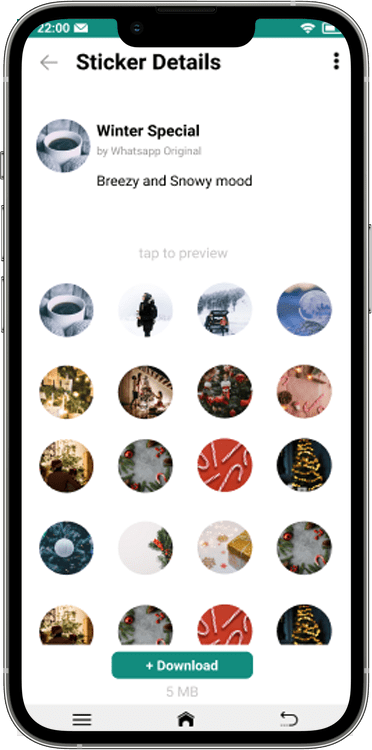
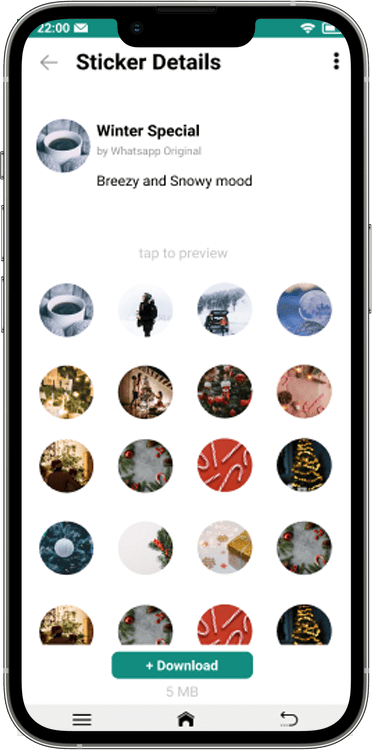
- See details of a Sticker collection
- Gain access to 3rd-party Sticker apps
Accessing Stickers
- See recent Stickers that has been used
- Delete unwanted Stickers in their collection
For Whatsapp
- New business opportunities through sponsored and official Stickers
- Increase the number of Sticker usage
- Promote their own official Stickers
- Build collaboration with 3rd-party Sticker apps
Design
To help us organize the page and its feature, we create an information architecture before we create its interface.
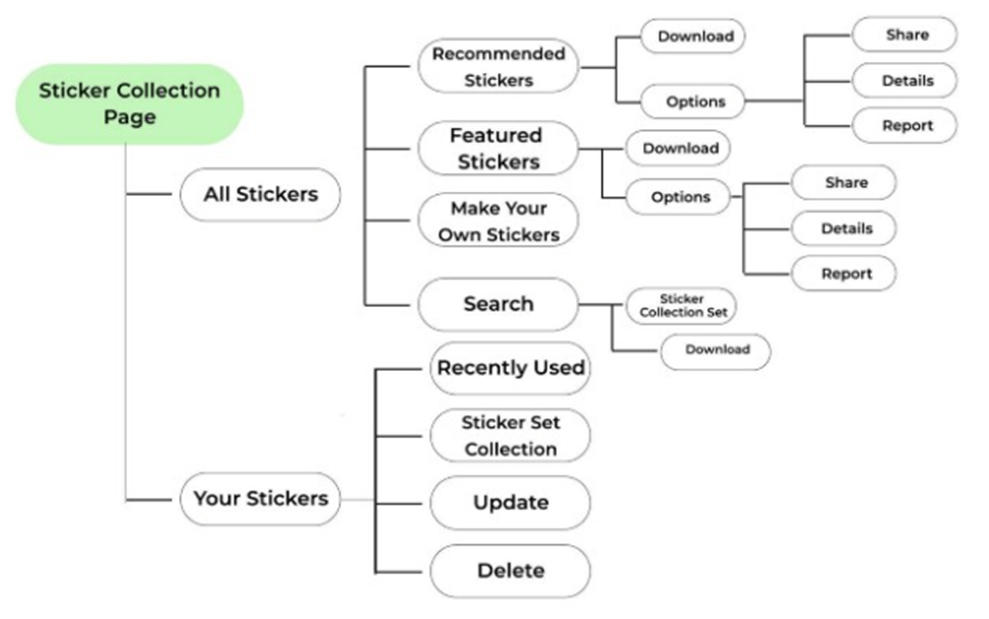
Based on this information architecture, we can create a wireframe for this page and a design system to keep consistent design throughout the pages.
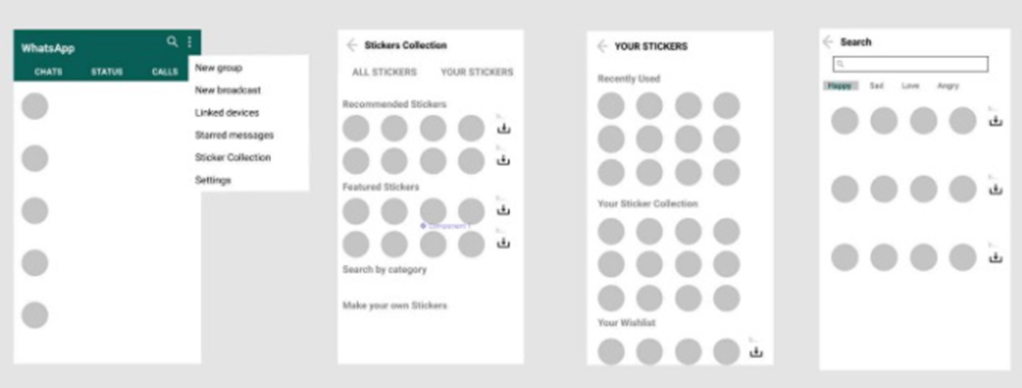
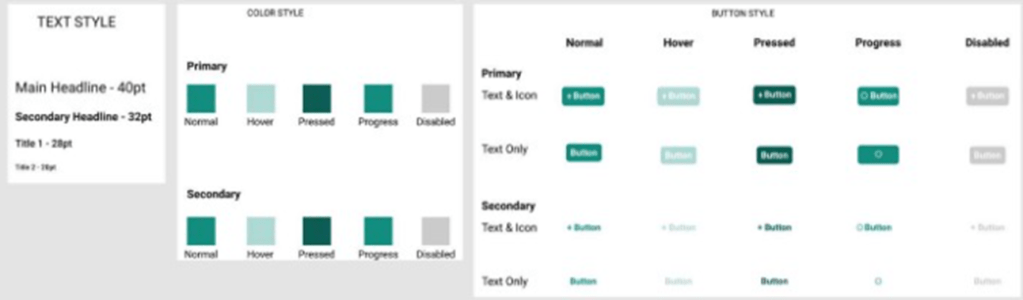
Through this wireframe and design system, we can finally create the UI design of this page. Below are the results:
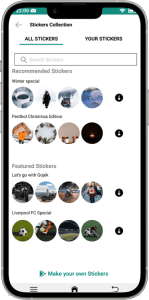
Choose Stickers from various creator
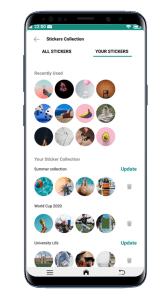
Browse Sticker collection
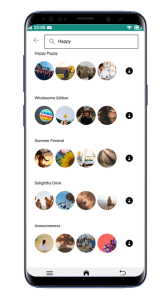
Find Sticker with search feature
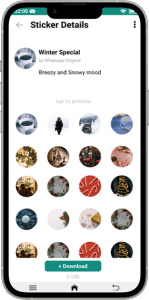
Download Sticker directly
Validation
After Sticker page design is finished, the final step in this project is to test and validate our design to the user. To do this, we conducted an usability testing.
Usability testing is a research where user or participants use this page with some given tasks or scenario while being observed to see their journey, pain points, and feedback.
Preparation
We need to determine the criteria to fit the user of this page. Therefore, our participant criterias are:
- Actively use Whatsapp for communication
- Join and active in group chat
- Has >100 Sticker on their account
To create a real-life situation where user interact with our page, we designed a scenario and give some tasks to our participants to observe their reaction.
Scenario
You want some happy themed Sticker. How do you find it within this page?
Tasks
- Download 2 new Sticker collection
- Delete 1 Sticker from your collection
Result
After we conducted the usability testing to several participants, we obtained some feedbacks for our prototype.
We noticed some interesting behavior from our participants in this usability testing, they also give us some recommendation for this page:
- Some user tried to choose “Create Your Own Sticker” option, but did not proceed
- Tried search feature without being instructed
- A filter feature in search page might be useful
However, more importantly, we noticed participants experienced some problems in this test. We divide the problems into 3 categories:
- Critical – Causing significant impact on user’s journey/experience. Therefore need to be prioritized.
- Medium to low – Has moderate impact on user journey/experience. Need to be fixed but not urgent.
- Cosmetics – Has little impact on user journey/experience. Can be addressed after other problems has been resolved.
Here are the problems we found in this usability testing:
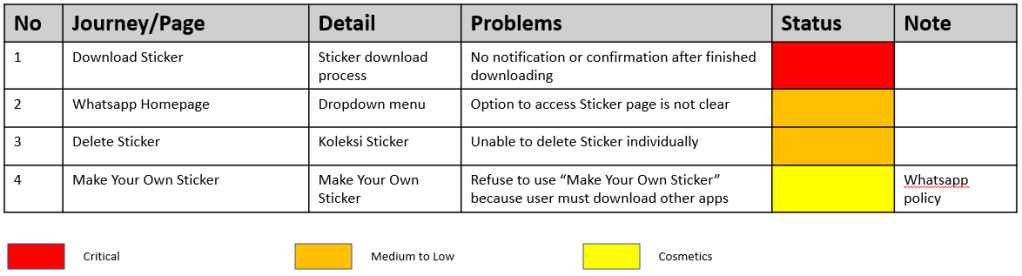
Problems & Solution
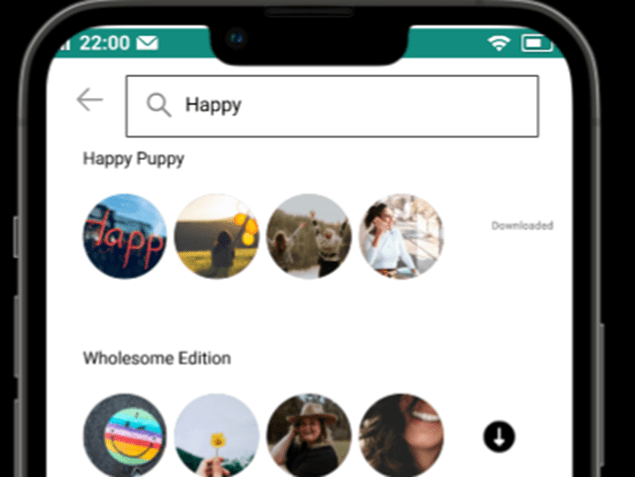
Problem 1: Sticker download progress
After finished downloading, there is only “Downloaded” text next to Sticker collection.
Most participants were confused after downloading Stickers. They were not sure on what to do next.
Solution: After finished downloading, a pop-up overlay that says “Sticker has been added” will appear as confirmation.
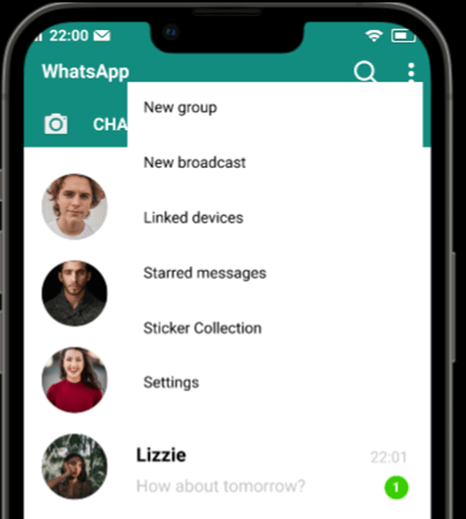
Problem 2: Unnoticeable option
Respondent didn’t notice this option straight away because it’s mixed with other menus.
Solution: We think it is because user has not familiar yet with this page. We need to ‘wait and see’ if this problem persist in the future.
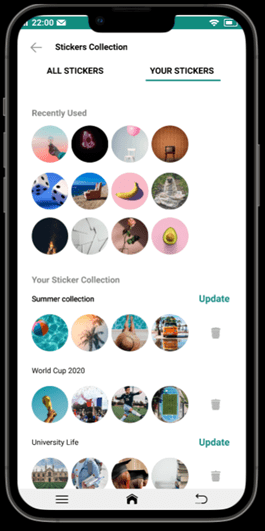
Problem 3: Individual Sticker deletion option
The delete feature is removing Stickers per group. User prefer to be able to delete Sticker individually
Solution: We built feature to delete Sticker individually with hold gesture.
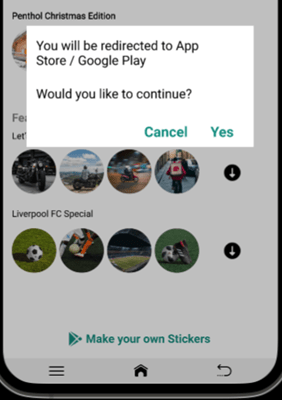
Problem 4: Reluctant to use “Create Your Own Sticker”
User refused or felt reluctant to use this feature because it requires them to download separate app.
Because this is related to Whatsapp policy and business partnership, unfortunately there is no possible UI/UX solution yet for this problem.
Final Result
After we finished the whole design process, now the design for Sticker collection page has been finished.
 ABHIRAMA TARISNADHIL